
The Family Core
The Family Core, LLCParenting
4.614.00 Reviews
- Version
- 2.123
- Installs
- 10.00K
- Age Rating
- Everyone
Screenshots



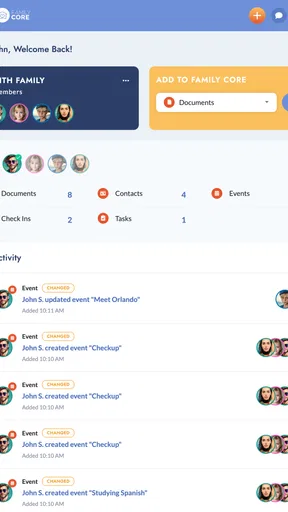
Our Review of The Family Core
 Analysis by Appyee
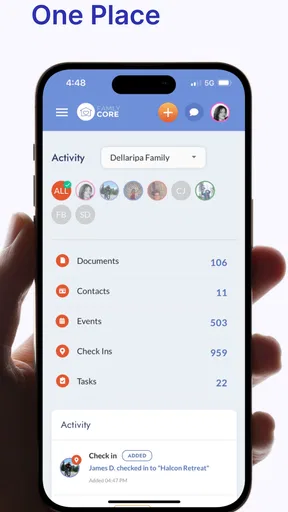
Managing a household often means keeping several small systems in your head at once: who needs attention, what information belongs to whom, and how to keep family matters from becoming scattered across unrelated apps. The Family Core approaches that problem as a family management app from The Family Core, LLC. I found its appeal less in flashy extras and more in the idea of bringing family coordination into one shared space.
That distinction matters. This is not an entertainment app, a social network, or a replacement for every calendar, messaging service, and device setting a household may already use. Its value depends on whether your family wants a more organized way to handle shared information while still respecting personal boundaries. After spending time with it, I see it as a practical option for households that need a common point of reference, provided everyone agrees on how it should be used.
How it feels in a shared household
The most convincing use case is a family that shares responsibilities but does not want every conversation buried in individual text threads. A parent may need to coordinate with another adult, a teenager may need to know what affects the household, and younger children may simply need information presented in an age-appropriate way. A family management app can help only when those different needs are separated rather than treated as one identical audience.
That is where I would begin with this app: not by moving every piece of family information into it, but by deciding what genuinely benefits from being shared. Household plans, reminders, recurring responsibilities, and information that several people need are sensible candidates. Private conversations, sensitive records, and personal notes should remain in tools designed for those purposes unless the family has deliberately agreed otherwise.
In everyday use, the app makes most sense as a central coordination layer. Imagine a household preparing for a busy week. One adult is handling appointments, another is managing school-related tasks, and a child needs to understand what is happening without seeing every adult discussion. The useful workflow is to place shared items where the relevant people can find them, then keep unrelated details out of the common view. That simple discipline prevents a family organizer from turning into an unfiltered information dump.
The strongest benefit is clarity, not control. Families sometimes install management tools expecting them to solve disagreements or enforce routines automatically. I would not approach this app that way. It is better understood as a place to make agreed responsibilities visible and easier to discuss. The household still needs to decide who updates information, how quickly changes are made, and what counts as private.
Shared-device households should also think about the physical setting. If several people use the same tablet or phone, leaving a family-management screen open can expose information to the next person who picks it up. I recommend treating the device itself as a public surface: close the app when finished, avoid displaying sensitive details in shared areas, and use separate personal devices for matters that should not be visible to everyone nearby. Those habits are just as important as the app’s organization.
Start with a small, useful family core
My practical advice is to begin with one household problem rather than attempting a complete digital migration. Choose a narrow purpose, such as coordinating weekly responsibilities or keeping shared plans in one place. Use it consistently for a short period, then decide whether the family is actually checking it. If people continue to rely on scattered messages and verbal reminders, adding more information will only make the system harder to maintain.
This staged approach also reveals whether the app suits your family’s communication style. Some households prefer a visible shared system; others work better with quick conversations and a conventional calendar. The Family Core is more likely to help the first group. It is less convincing for a family that already has a simple routine everyone follows without friction.
Setting boundaries before inviting everyone in
Setup is not only a technical step. It is a household agreement. Before adding family members or placing important information inside the app, I would establish basic boundaries: who is allowed to create or change shared items, which subjects are suitable for a common space, and how disagreements will be handled when information is incomplete or outdated.
This is especially important when a device is shared. A single device can make an app feel convenient, but convenience can blur account boundaries. Each person should know whether they are looking at their own information, a shared family view, or something intended for another household member. Do not assume that a family-oriented app removes the need for those distinctions. Good organization starts with clearly defined ownership.
For parents, the age context is worth considering before children participate. The app carries an Everyone content rating, which makes it broadly approachable, but that rating should not be treated as a substitute for parental judgment. A child’s ability to understand shared information, recognize private material, and follow the family’s rules matters more than the label alone.
I would also avoid creating a single all-purpose account for everyone merely because it seems faster. Shared credentials can make a household system difficult to audit and may lead to accidental changes. A better arrangement is to keep personal boundaries clear wherever the app’s available account structure allows it, while reserving the shared area for information that truly belongs to the household. The goal is not to make every family member see everything; it is to make the right information easy for the right people to find.
Another useful preparation step is deciding who will maintain the system. If everyone is responsible for everything, nobody may feel responsible for keeping it current. Assigning an adult to review shared information periodically can prevent stale plans from becoming a source of confusion. That person does not need to control every entry; they simply act as the household’s consistency check.
What to check before relying on it
The app is free to install, which makes trying it relatively easy. It also includes optional in-app purchases priced at $9.99 per item, so I would review any purchase screen carefully before treating the app as a long-term household system. A free starting point is useful, but families should decide whether optional paid items fit their budget and whether the added value is relevant to their actual routine.
Compatibility is another practical consideration. The current version is 2.123 and requires Android 6.0 or later. That covers many older Android devices, but households with mixed hardware should still check every phone or tablet they expect to use. A family workflow becomes unreliable when one person cannot access the same system because their device is unsupported or outdated.
I would test the app with low-stakes information first. Add a simple shared item, ask each intended user to locate it, and then check what happens when someone changes or removes it. This exercise answers practical questions that a short description cannot: whether the layout is understandable to less technical relatives, whether the shared workflow feels natural, and whether the household can agree on a sensible editing routine.
Coordination without turning family life into administration
Family organization can become exhausting when the tool requires more maintenance than the problem deserves. My preferred test is whether the app reduces repeated explanations. If one person can record a shared detail once and the relevant family members can find it without another round of messages, the system is earning its place. If every small change requires several updates and reminders, the app may be adding work instead of removing it.
The Family Core is best approached with a “shared essentials” rule. Keep the common area focused on information that affects more than one person. That might include a household plan, a responsibility that needs visibility, or a note that prevents the same question from being asked repeatedly. Avoid filling it with every thought, link, or personal detail. A crowded family space is difficult to scan, especially for children and relatives who do not enjoy managing digital systems.
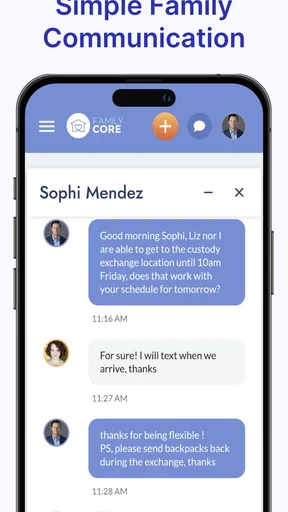
A non-obvious advantage of this approach is that it creates a useful distinction between coordination and conversation. The app can hold the stable facts of a plan, while a separate messaging tool can handle discussion and last-minute negotiation. Trying to make one app perform both jobs often creates clutter. I would use this app for the information people need to retrieve, not necessarily for every conversation surrounding it.
There is also a trade-off between visibility and flexibility. A shared system makes responsibilities easier to see, but it can make informal changes feel more official than intended. If someone swaps a task or adjusts a plan, the update should be reflected promptly; otherwise, the shared view loses credibility. Families that adopt the app should agree that changes made outside the app need to be recorded when they affect other people.
For a household with separated parents, extended relatives, or caregivers, boundaries become even more important. The right arrangement depends on which information genuinely needs to cross household lines. I would avoid granting broad access simply for convenience. Instead, decide whether the person needs the entire shared context or only selected coordination details. This keeps family management practical without making every relationship part of one large information pool.
A realistic weeknight example
Consider a weekday evening when one parent is delayed, another adult is handling dinner, and a child needs to know what responsibility still applies. A well-maintained shared family space can reduce the number of separate messages: the current plan is recorded once, the relevant people check it, and the family can focus on carrying it out. The benefit is modest but real. It is not about automating the household; it is about avoiding preventable misunderstandings.
The same scenario exposes the app’s limitation. If nobody updates the plan after circumstances change, the shared record may be less useful than a direct conversation. I would therefore pair the app with a simple habit: whenever a change affects another person, update the shared information immediately or tell that person directly. The app can support coordination, but it cannot compensate for delayed communication or unclear responsibility.
Age, trust, and the limits of a family label
Because this is a parenting app with an Everyone rating, it may initially seem suitable for any household member. In practice, suitability depends on maturity and context. Younger children may need an adult to explain what information is shared and why. Older children may be able to participate more independently, but they still deserve a clear explanation of what is visible to others and what remains personal.
I would introduce the app as a cooperation tool rather than a surveillance device. That framing affects whether children treat it as useful or intrusive. If the app becomes associated only with monitoring, they may avoid engaging with it honestly. If the family explains which information is shared for practical reasons and which conversations remain private, the system has a better chance of building trust.
Parents should also remember that an age rating does not tell them whether a particular family workflow is emotionally appropriate. A child dealing with sensitive circumstances may need more privacy than a routine household organizer provides. In those cases, a private conversation, a dedicated personal notes tool, or direct support from a trusted adult may be better. The Family Core should not be used as a substitute for judgment, care, or professional help.
Trust also applies between adults. A shared management app can expose differences in standards: one person may update information immediately, while another may treat it as optional. Rather than assuming the tool will settle those differences, agree on a few simple rules before relying on it. For example, decide which items require confirmation and which can be changed freely. This prevents the app from becoming a new source of arguments.
Privacy-conscious users should make the same careful assessment. A family-oriented label does not mean every type of personal information belongs in the app. Keep highly sensitive material out of shared spaces unless you have a clear reason and understand who can access it. On shared devices, use extra caution around notifications, open screens, and saved sessions. These are ordinary precautions, but they are easy to overlook when an app feels designed for family use.
How it compares with familiar alternatives
The usual alternative is a general calendar combined with a group chat. That combination can be more flexible for families who already have established habits, and it may be preferable when the main need is scheduling rather than broader family organization. Its weakness is fragmentation: plans live in one place, discussion in another, and important details can disappear inside a long message history.
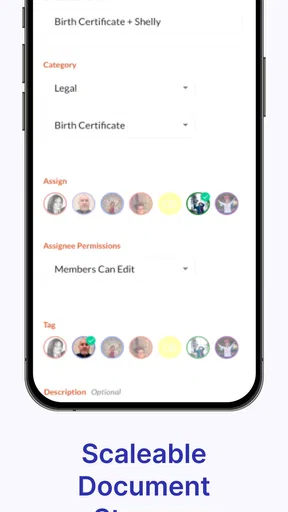
A shared notes app is another close comparison. Notes are excellent for lists and reference material, but they often lack the family-specific framing that makes responsibilities easier to understand. If your household only needs a grocery list or a packing checklist, a notes tool may be simpler. The Family Core becomes more interesting when the household wants a dedicated family-management environment instead of a generic document.
Traditional messaging remains better for urgent changes and nuanced conversations. If a child is waiting for a pickup change or an adult needs an immediate answer, a direct message is usually faster than expecting everyone to refresh a shared management space. I would not replace messaging with this app. I would use the two differently: direct communication for urgency, shared coordination for information that should remain findable.
Parental-control products are also not interchangeable with this app. Those tools are generally chosen for device limits, content restrictions, or monitoring. The Family Core belongs to a different part of parenting technology: organizing family information and coordination. If your main goal is screen-time enforcement or online safety controls, you should look elsewhere rather than expecting a family management app to provide that function.
That separation is one of the most important buying decisions. The app may suit a household that wants a shared organizational center, but it is not automatically the best choice for a family seeking advanced device supervision, a full school planner, or a replacement for private communication. Choosing it for the right problem will make the experience feel focused; choosing it for every parenting problem will likely lead to disappointment.
Who should try it and who should skip it
I would recommend giving it a fair trial if your household repeatedly loses track of shared plans, has several caregivers, or needs a clearer boundary between family information and personal conversations. It is also worth considering when relatives use different communication habits and a common family space could reduce repeated explanations. The free entry point makes a cautious test reasonable, especially if you start with a limited workflow.
I would be more hesitant for a small household that already manages everything smoothly with a calendar and a short group chat. Adding another destination may create duplication rather than clarity. I would also skip it as a primary solution if your main requirement is device monitoring, strict parental controls, or detailed personal scheduling. A specialized tool will usually be a better match for those jobs.
Families should be prepared for the human side of adoption. The app cannot make people check shared information, update changes, or respect privacy boundaries. Its success depends on a routine that feels easier than the old one. If only one person uses it, it may become that person’s private filing cabinet instead of a family system. Before committing, ask whether everyone who needs access is willing to participate.
The Family Core has attracted a 4.6 average from around 142 ratings and has passed 10K installs, which suggests a modest but positive user base. I would treat those figures as encouragement to explore it, not as proof that it will suit every household. Family organization is highly personal: the same structure that helps one home may feel unnecessary or restrictive in another.
It is free, rated for Everyone, and developed by The Family Core, LLC, so the basic barrier to experimentation is low. Optional purchases at $9.99 per item mean I would avoid buying anything until the household has used the core workflow long enough to identify a real need. That prevents the common mistake of paying for possibilities before establishing a useful routine.
My household verdict
After looking at it as a real family-management tool rather than a universal parenting solution, I see a clear place for The Family Core. Its best role is a shared coordination layer: a focused space for information that several people need, with enough separation to encourage sensible account and privacy boundaries. The app is most valuable when the family agrees on what belongs there and keeps that information current.
My favorite practical insight is to treat the shared space as a household noticeboard, not a diary and not a control panel. Put stable, useful information there; keep private matters elsewhere; use direct messages when speed or sensitivity matters. That division makes the app easier to maintain and reduces the risk of exposing more than intended on a shared device.
I also recommend testing it through one ordinary week rather than judging it after a quick installation. Notice whether people can find what they need, whether updates are made promptly, and whether the app reduces repeated questions. If it does, expand gradually. If it creates another chore, return to the simpler tool your family already understands.
For me, this is a promising choice for families seeking structure without turning every interaction into formal administration. It will not replace judgment, trust, urgent communication, or specialized parental controls. But when the problem is scattered household information and unclear coordination, this app is worth trying as a calm, shared starting point.
Verdict
Strengths of The Family Core
- Centralizes family schedules, tasks, and shared information in one place.
- Helps parents coordinate responsibilities and reduce missed activities.
- Shared planning can improve communication between family members.
- Useful for organizing routines, appointments, and household commitments.
- A practical digital alternative to scattered notes and messaging threads.
Limitations of The Family Core
- Requires regular updates from everyone to keep information accurate.
- Some family members may need time to learn the app’s workflow.
- Privacy settings should be checked carefully before adding sensitive details.
- Its usefulness may be limited if relatives do not actively participate.
- Notifications can become distracting when many tasks and events are added.
Similar Picks in This Category
View All
Family Space
Motorola Mobility LLC.3.9

شرطة الأطفال - مكالمة وهمية
Oub Apps4.1

Findmykids: Parental Control
LETEM LTD4.6

Pregnancy + | Tracker App
Philips Electronics UK Limited4.8

Policía de niños - para padres
Kids police4.7

Pregnancy App
Amila4.9
Frequently Asked Questions
What is The Family Core and what can I use it for?
The Family Core is designed to help families organize shared routines, communication, and everyday responsibilities in one place. Depending on the version and available features, it may support family profiles, schedules, reminders, shared activities, and household coordination. It is most useful for parents and relatives who want a clearer overview of plans and tasks rather than relying on separate messaging apps, calendars, or handwritten notes.
Is The Family Core suitable for children and different family members?
The app is intended to support family use, but suitability depends on the age of the users and the way parents configure it. Adults should review the available settings, permissions, and communication features before inviting children. Younger users may need supervision, especially if the app includes accounts, messaging, location-related tools, or access to shared family information. Parents should also check the current age rating before downloading.
Does The Family Core require an internet connection or an account?
Most family-management applications require an account so that information can be synchronized between parents, children, and other invited members. An internet connection may also be necessary for updates, invitations, cloud synchronization, notifications, or shared schedules. Some basic information might remain visible offline, but users should not assume every feature works without connectivity. Check the app’s current store description for exact requirements.
Is The Family Core free to download, and are there in-app purchases?
The Family Core may be available as a free download, although certain tools, expanded storage, premium family features, or subscription options can depend on the current version. Before installing, review the Google Play Store or Apple App Store listing carefully for pricing details, trial conditions, recurring charges, and cancellation rules. If several family members use the app, confirm whether one purchase covers everyone or requires separate plans.
What privacy and permissions should I consider before using The Family Core?
Because The Family Core is intended for family coordination, it may handle personal information such as names, profiles, schedules, messages, reminders, or other shared details. Before creating an account, read the privacy policy and inspect requested permissions, particularly notifications, contacts, location, camera, microphone, and storage access. Grant only permissions that are necessary, use strong passwords, and avoid sharing sensitive information unless the app’s privacy controls are clear.
